On a MSDyn365FO 8.1 Microsoft-hosted VM, you don't get admin rights. Open the Cloud POS solution from the Retail SDK under those conditions and you'll hit an error — it needs IIS rights, which normally means running Visual Studio as Administrator.
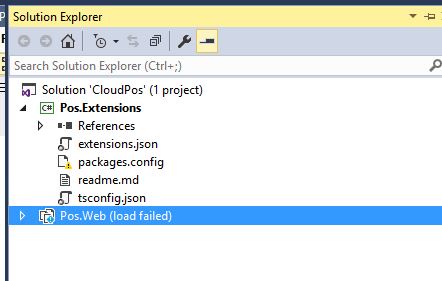
The workaround
Switch Cloud POS to run on IIS Express instead of IIS, following this guide:
Cloud POS development box setup
Note: for step 2, you'll find aspnet.config and redirection.config in:
C:\Program Files\IIS Express\config\templates\PersonalWebServer
With Cloud POS running on IIS Express, you can debug normally by attaching to iisexpress.exe — no admin rights on IIS required.
Special thanks to my mentor Mugunthan Mani from Microsoft for this tip.